KPI Depot has launched a remote MCP connector that lets AI assistants search, read, and benchmark against its full KPI library live, inside the conversation. It works with Claude today and with any MCP-compatible client. The endpoint is https://kpidepot.com/mcp.
For the last two years, analysts have quietly changed how they build board decks and quarterly reviews. The first draft increasingly starts in a conversation with an AI assistant. The one thing those assistants have never been good at is benchmarks. Ask a chatbot how your gross margin compares to your industry and you get a confident number that may be completely made up.
That is the problem this connector solves.
If you have not run into MCP yet, here is the one-sentence version. The Model Context Protocol is an open standard that lets an AI assistant connect to a live data source and pull real information mid-conversation, instead of relying on whatever it happened to memorize during training.
Why AI Assistants Get Benchmarks Wrong
Large language models hallucinate benchmarks by design. When you ask for a figure the model does not actually know, it generates something plausible, because generating plausible text is what it does. You end up with "roughly 3 to 1, probably," delivered with total confidence and zero sourcing. In a board meeting, that is worse than having no number at all.
A benchmark is only useful if you can defend it. Where did it come from, what industry, what time period, how big was the sample. KPI Depot's database carries that context on every benchmark. The connector hands it to your AI assistant directly, so the answer shifts from "about 3:1, probably" to "2.87:1, from OpenSend, April 2025, and here is the link."
What Does the KPI Depot Connector Do?
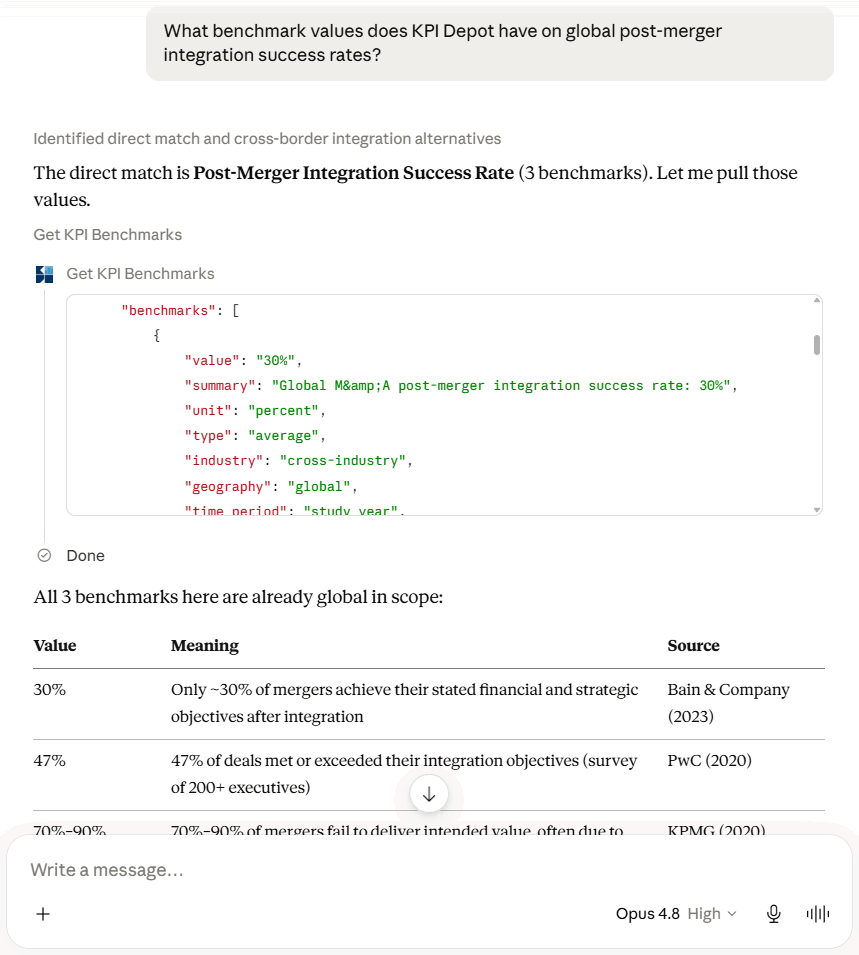
The KPI Depot connector gives an AI assistant three read-only tools it can call on its own when a question calls for them.
The first tool is KPI search. Ask something like "search KPI Depot for KPIs about customer churn" and the assistant returns up to ten relevance-ranked KPIs, each with a one-line definition, a count of available benchmarks, and a link to the full page. Results can be filtered by corporate function and industry.
The second tool returns full details for a single KPI. Ask for Days Sales Outstanding and you get the definition, the standard formula, the common pitfalls people hit when they calculate it, the levers that move it, related KPIs, and the KPI groups it belongs to.
The third tool returns benchmark data for a specific KPI. Ask for Ad Spend Return and the assistant can hand you the average across most industries, the typical range, figures broken out by industry, and figures broken out by channel, each row carrying its own source. Every benchmark response includes a citation pointing back to the canonical KPI Depot page.
KPI Depot covers more than 20,000 KPIs and 30,000 industry benchmarks across 15 corporate functions and 150+ industries.
What Can You Ask It?
These prompts are real and tested:
- "Search KPI Depot for KPIs about customer churn"
- "Get the full KPI Depot details for Days Sales Outstanding, including definition, formula, and common pitfalls"
- "Our maintenance cost runs 4% of replacement asset value. How does that compare to KPI Depot's industry benchmarks?"
- "Pull the benchmark values for Ad Spend Return and summarize them in a table"
Is the Connector Free?
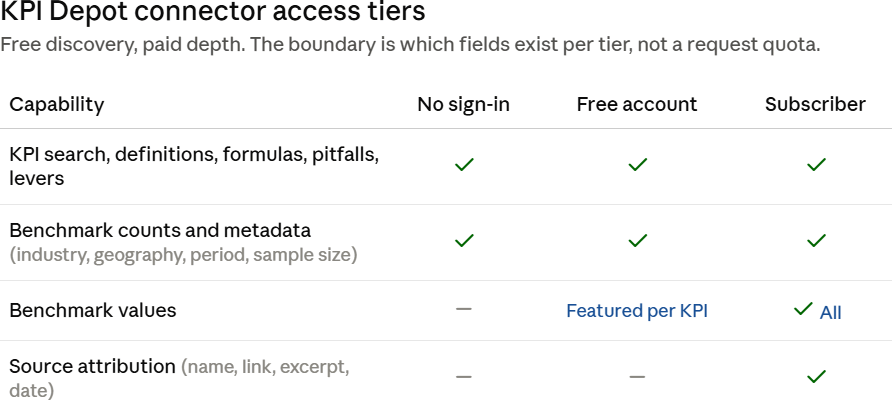
The connector is free to start, with paid depth. The free and paid boundary is structural, based on which fields exist at each tier, not a request quota.
Anyone can use the connector with no account. KPI search, definitions, formulas, pitfalls, and improvement levers are open, along with the metadata around each benchmark: industry, geography, time period, and sample size.
Asking for actual benchmark values prompts sign-in. A free account takes under a minute to create and unlocks a featured benchmark value for each KPI. A paid subscription unlocks every benchmark plus full source attribution: the source name, the link, the publication date, and a verbatim excerpt.
If you already subscribe to KPI Depot, all of this is included. There are no extra API fees and no separate product to buy.
How Do You Connect It?
The KPI Depot connector works with any MCP-compatible AI client. The endpoint is always the same: https://kpidepot.com/mcp.
A quick note before the steps. These AI tools update their interfaces frequently, and MCP support in particular is evolving fast, so the exact menu names and steps below may have shifted by the time you read this. If something does not match what you see, check the provider's own connector documentation for the current flow. The endpoint URL, however, never changes.
Claude (the simplest path, works on any paid Claude plan)
KPI Depot is listed in the official Claude Connectors Directory, so you no longer need to add a custom connector.
- Click your name, then Settings.
- Go to Customize, then Connectors.
- Click +, then Browse connectors.
- Search for
KPI Depotand then click Connect. - Start a chat.
You can also open the listing directly: https://claude.ai/directory/connectors/kpi-depot
If the directory listing is not available on your plan or workspace, use Add custom connector instead. Enter Name: KPI Depot, and Remote MCP server URL: https://kpidepot.com/mcp
ChatGPT (requires Developer Mode; available on paid plans)
- Open Settings, then Connectors.
- Turn on Developer Mode under the advanced or connectors area.
- Return to Connectors and choose Create connector.
- Enter Name:
KPI Depot, and MCP server URL:https://kpidepot.com/mcp. - Enable the connector inside a chat when you want to use it.
Some ChatGPT connector features are limited to Business and Enterprise workspaces.
Google Gemini (consumer path, through Gemini Spark)
- On your computer, go to gemini.google.com.
- Click Settings and help, then Connected Apps.
- Under custom apps, add a new app using the MCP server URL
https://kpidepot.com/mcp. - Follow the sign-in prompts to authorize it.
Google currently restricts this to eligible personal accounts, so check Gemini's help pages for availability in your region and account type. For organizations, Gemini Enterprise connects custom MCP servers through the Google Cloud console as an admin setup rather than a personal one.
Microsoft Copilot (through Copilot Studio)
- Open Copilot Studio.
- Go to your agent, then Tools or Add a tool.
- Choose Model Context Protocol, or use the MCP onboarding wizard.
- Enter the server URL
https://kpidepot.com/mcpand complete the connection.
This is an agent-builder flow aimed at makers and admins rather than a one-click toggle in consumer Copilot chat.
Any other MCP client
- Point it at the endpoint
https://kpidepot.com/mcpover Streamable HTTP. - Authenticate with OAuth sign-in, or an API key sent as a bearer token.
- Get a free API key at
https://kpidepot.com/mcp/register, or generate one from your account area if you subscribe.
Why KPI Depot Built This
Many content businesses are blocking AI crawlers right now. KPI Depot went the other way and built a structured, metered front door instead: free discovery, paid depth, with a clean boundary between them.
The engineering reflects that stance. All three tools are read-only. There is no bulk export, since searches cap at ten results and benchmarks are served one KPI at a time. Authentication uses OAuth 2.1 with tokens stored only in hashed form. The privacy policy has a dedicated connector and API section, with a twelve-month log retention window and no third-party sharing.
Frequently Asked Questions
What is the KPI Depot MCP connector?
It is a remote Model Context Protocol connector that lets AI assistants search KPIs, read full KPI intelligence, and retrieve source-attributed industry benchmarks from KPI Depot live inside a conversation.
What is the connector endpoint URL?
The endpoint is https://kpidepot.com/mcp, served over Streamable HTTP.
Which AI assistants support it?
It works with Claude today via a custom connector, and with any MCP-compatible client. Support in other clients depends on those products' MCP rollout.
Does it cost anything?
No account is needed for KPI search, definitions, and formulas. A free account unlocks a featured benchmark value per KPI. A paid KPI Depot subscription unlocks all benchmark values with full source attribution.
How do I get an API key?
Free API keys are available through self-serve registration at https://kpidepot.com/mcp/register. Subscribers can generate a key from their account area.
Is my data shared?
No. The tools are read-only, request logs are retained for twelve months, and there is no third-party sharing.
Try it free. Add https://kpidepot.com/mcp as a custom connector in Claude, or grab a free API key at https://kpidepot.com/mcp/register.